Supo.live Alternative
SupoClip vs supo.live: Why Open Source Wins
For creators and teams who want control over their clipping workflow, SupoClip is the better open-source alternative to supo.live.
By SupoClip · Updated September 21, 2026 · 5 min read

The quick verdict
Choose SupoClip when control matters.
Open source. Your deployment. Your workflow. A strong foundation for turning recorded content into captioned shorts.
Choosing an AI video clipper is also choosing how much control you keep over your production process. If you want to turn podcasts, interviews, talks, and stream recordings into short videos, SupoClip makes a compelling case: AI-assisted editing with source code you can inspect and a workflow you can run yourself.
Our verdict: SupoClip is the better alternative for creators, agencies, and developers who prioritize open source, self-hosting, and customization. This is a comparison by the SupoClip team, based on documented capabilities, rather than a benchmark of clip quality or processing speed.
What is SupoClip?
SupoClip is an open-source AI video clipping tool available through supoclip.com or as a self-hosted application. It analyzes long videos, selects promising moments, and produces vertical clips with face-centered cropping and word-synced subtitles. Hook titles, clip scoring, and optional B-roll help turn a raw recording into material ready for your final review. The SupoClip repository documents the features and setup.
What is supo.live?
Supo.live markets a hosted clipping service for both recordings and ongoing broadcasts. Its homepage advertises live clipping, styled captions, face tracking, a browser editor, and scheduled posting to TikTok, YouTube Shorts, and X. That makes live publishing its clearest point of distinction. See the official supo.live feature overview.
SupoClip vs supo.live at a glance
| Priority | SupoClip | supo.live |
|---|---|---|
| Deployment | Hosted app or self-hosted deployment | Hosted service |
| Source access | Public AGPL-3.0 repository | No open-source or self-hosting option advertised on its homepage |
| Core use case | Recorded long videos into vertical shorts | Live broadcasts and recorded videos |
| Customization | Modify the code and configure the LLM provider | Use the service’s editor and settings |
| Usage model | Self-hosting uses your compute and provider budget | Subscription plans with processing credits |
Supo.live details reflect its homepage checked September 21, 2026. Features and plans can change.
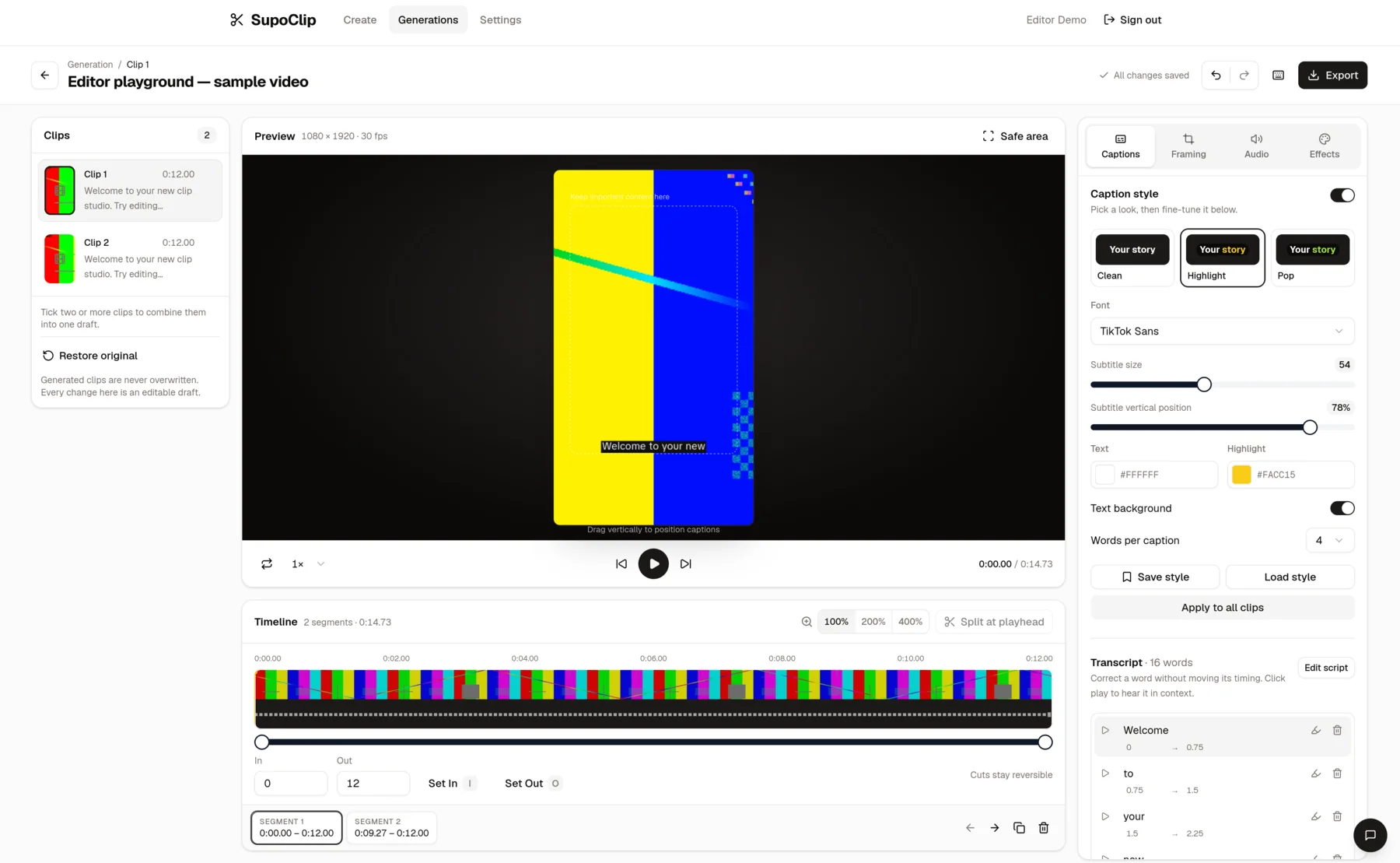
From one recording to a repeatable workflow
Let AI handle the first pass, then use your editorial judgment. Every clip should make sense on its own, retain the speaker’s context, and earn its place in your feed.
- 01
Bring a recording
Upload a video or use a supported YouTube link.
- 02
Discover the moments
Transcription and AI scoring create a shortlist.
- 03
Make the cut yours
Review timing, vertical framing, and captions.
- 04
Export your shorts
Prepare the final clips for your social channels.
Why SupoClip is the better open-source alternative
1. You can shape the workflow around your content
A podcast studio and an educational channel may want very different clips. With SupoClip, source access lets a technical team adapt selection logic, caption behavior, and processing steps to its editorial needs. You can inspect how the system works and develop changes in your own deployment. That flexibility is SupoClip’s strongest advantage over relying entirely on a hosted product’s settings.
2. You choose where the application runs
Self-hosting gives you control over the application’s infrastructure, storage configuration, and maintenance schedule. You can build clipping into an existing production environment and keep a deployment you manage. Transcription and hosted AI providers still receive the data needed for their work, so self-hosting does not mean all processing is offline.
3. You have a practical choice of AI providers
SupoClip supports LLM configurations for Google, OpenAI, Anthropic, and local Ollama models. That lets you evaluate providers against your own content and budget. The documented transcription pipeline uses AssemblyAI; using a local LLM does not remove that dependency. See the configuration guide for setup options.
4. Your clipping workflow can grow into your own tools
SupoClip includes a REST API and an MCP server. Developers can connect clipping to other applications or compatible AI clients instead of treating the browser as the only entry point. For an agency processing recurring client recordings, that creates room to build a repeatable workflow around its own review process. The API reference explains the available endpoints.
Your deployment
- Application and source code
- Storage and processing resources
- Editorial customization
Connected AI services
- AssemblyAI transcription
- Hosted LLM or local Ollama
- Provider costs and data flows
Cost: free source code, real operating costs
SupoClip’s open-source code is free to self-host. Your actual costs depend on compute, storage, transcription, paid model usage, and the time needed to maintain the installation. Capacity follows the resources you provision and provider limits. This can be attractive for teams that already run infrastructure, but it is not a promise that every workload costs less.
The hosted SupoClip service is a separate option with its own pricing and terms. Choose it when you want to start with less setup; choose self-hosting when control over the deployment is the priority.
Which should you choose?
Choose SupoClip for a library of podcasts, interviews, webinars, or stream VODs that you want to repurpose through a customizable pipeline. It brings together clip discovery, scoring, captions, and vertical framing while giving you the freedom to inspect and extend the application.
If your essential requirement is clipping a broadcast while it is still running and automatically posting the results, evaluate supo.live’s advertised live workflow. SupoClip’s recorded-video workflow should not be treated as a verified replacement for those features.
Start building a clipping workflow you control
SupoClip is our pick for teams that want useful AI clipping today and room to adapt it tomorrow. Start with one representative recording, review the suggested clips, refine the captions and framing, and export the results. Then decide whether hosted convenience or your own deployment fits your workflow.

Your next recording deserves a second life.
- Start with a recording you know well
- Review the strongest suggested moments
- Refine the captions and export
Frequently asked questions
What is the best open-source alternative to supo.live?
SupoClip is a strong choice for creators and teams who want to turn recorded videos into shorts while retaining source access, self-hosting, and control over their AI clipping workflow.
Is SupoClip free to self-host?
SupoClip provides free source code under AGPL-3.0. Running it still involves hardware or hosting, storage, transcription, and any paid LLM usage. Hosted SupoClip has its own service terms and pricing.
Can SupoClip replace live-stream clipping and automatic posting?
This comparison recommends SupoClip for recorded videos and stream VODs. Supo.live advertises clipping during live broadcasts and scheduled social posting; those capabilities are not claimed as SupoClip equivalents here.
Explore our open-source video clipper guide or read the SupoClip vs OpusClip comparison.